> For the complete documentation index, see [llms.txt](https://ghostwritten.gitbook.io/kubernetes-exam-in-action/llms.txt). Markdown versions of documentation pages are available by appending `.md` to page URLs; this page is available as [Markdown](https://ghostwritten.gitbook.io/kubernetes-exam-in-action/cks-kao-shi/dashboard.md).
# Dashboard
### 1. 介绍
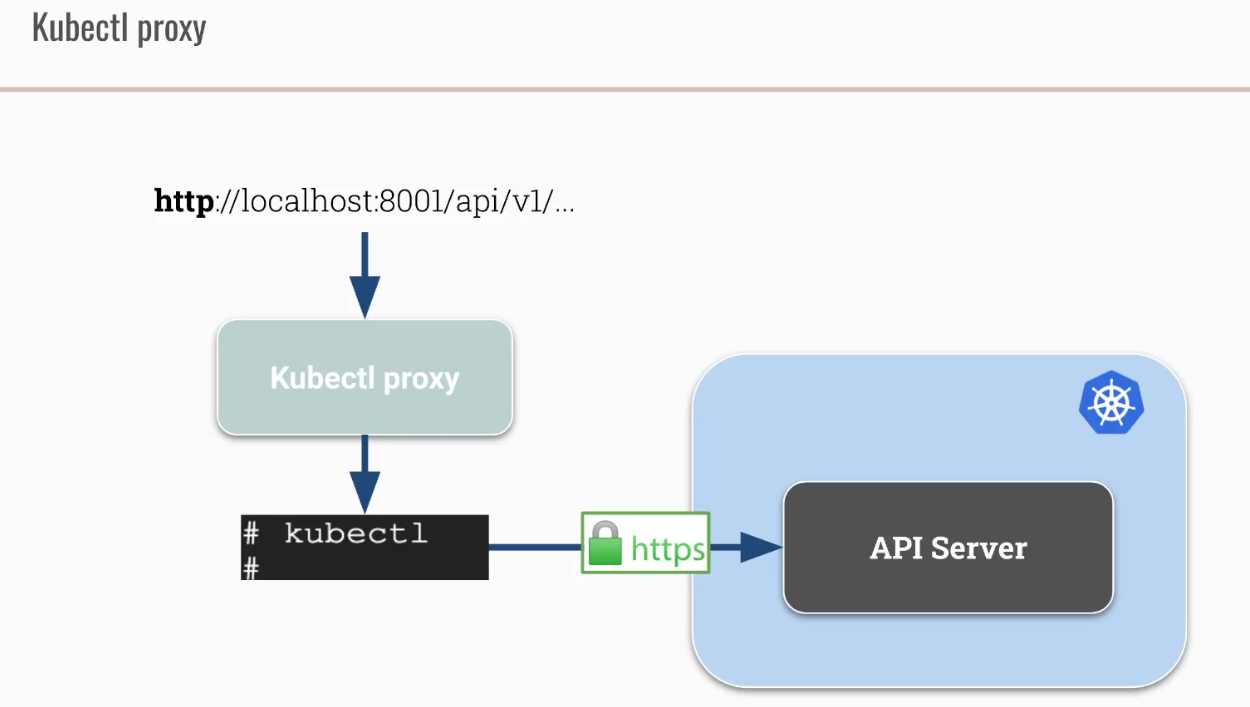
\\
!\[
\\]\()




### 2. 安装UI界面
```
root@master:~/dashboard# kubectl apply -f https://raw.githubusercontent.com/kubernetes/dashboard/v2.1.0/aio/deploy/recommended.yaml
namespace/kubernetes-dashboard created
serviceaccount/kubernetes-dashboard created
service/kubernetes-dashboard created
secret/kubernetes-dashboard-certs created
secret/kubernetes-dashboard-csrf created
secret/kubernetes-dashboard-key-holder created
configmap/kubernetes-dashboard-settings created
role.rbac.authorization.k8s.io/kubernetes-dashboard created
clusterrole.rbac.authorization.k8s.io/kubernetes-dashboard created
rolebinding.rbac.authorization.k8s.io/kubernetes-dashboard created
clusterrolebinding.rbac.authorization.k8s.io/kubernetes-dashboard created
deployment.apps/kubernetes-dashboard created
service/dashboard-metrics-scraper created
deployment.apps/dashboard-metrics-scraper created
root@master:~/dashboard# k -n kubernetes-dashboard get pod,svc
NAME READY STATUS RESTARTS AGE
pod/dashboard-metrics-scraper-79c5968bdc-92c6j 1/1 Running 0 4m19s
pod/kubernetes-dashboard-7448ffc97b-gspjg 1/1 Running 0 4m19s
NAME TYPE CLUSTER-IP EXTERNAL-IP PORT(S) AGE
service/dashboard-metrics-scraper ClusterIP 10.98.155.160 8000/TCP 4m19s
service/kubernetes-dashboard ClusterIP 10.99.150.161 443/TCP 4m20s
root@master:~/dashboard# k -n kubernetes-dashboard edit deploy kubernetes-dashboard
.....
containers:
- args:
- --auto-generate-certificates
- --namespace=kubernetes-dashboard
image: kubernetesui/dashboard:v2.1.0
imagePullPolicy: Always
......
改为
spec:
containers:
- args:
- --namespace=kubernetes-dashboard
- --insecure-port=9090
image: kubernetesui/dashboard:v2.1.0
root@master:~/dashboard# k -n kubernetes-dashboard get pod,svc
NAME READY STATUS RESTARTS AGE
pod/dashboard-metrics-scraper-79c5968bdc-92c6j 1/1 Running 0 14m
pod/kubernetes-dashboard-6568c7684c-jgqf4 0/1 ContainerCreating 0 4s
pod/kubernetes-dashboard-7448ffc97b-gspjg 1/1 Running 0 14m
NAME TYPE CLUSTER-IP EXTERNAL-IP PORT(S) AGE
service/dashboard-metrics-scraper ClusterIP 10.98.155.160 8000/TCP 14m
service/kubernetes-dashboard ClusterIP 10.99.150.161 443/TCP 14m
root@master:~/dashboard# k -n kubernetes-dashboard edit svc kubernetes-dashboard
apiVersion: v1
kind: Service
metadata:
annotations:
kubectl.kubernetes.io/last-applied-configuration: |
{"apiVersion":"v1","kind":"Service","metadata":{"annotations":{},"labels":{"k8s-app":"kubernetes-dashboard"},"name":"kubernetes-dashboard","namespace":"kubernetes-dashboard"},"spec":{"ports":[{"port":443,"targetPort":8443}],"selector":{"k8s-app":"kubernetes-dashboard"}}}
creationTimestamp: "2021-04-21T02:55:03Z"
labels:
k8s-app: kubernetes-dashboard
name: kubernetes-dashboard
namespace: kubernetes-dashboard
resourceVersion: "557996"
uid: bd515d85-4dc6-4ac0-9890-ca2a711a7b26
spec:
clusterIP: 10.99.150.161
clusterIPs:
- 10.99.150.161
ports:
- port: 9090 #443改为9090
protocol: TCP
targetPort: 9090 #8443改为9090
selector:
k8s-app: kubernetes-dashboard
sessionAffinity: None
type: NodePort #ClusterIP改为NodePort
status:
loadBalancer: {}
root@master:~/dashboard# k -n kubernetes-dashboard get svc
NAME TYPE CLUSTER-IP EXTERNAL-IP PORT(S) AGE
dashboard-metrics-scraper ClusterIP 10.98.155.160 8000/TCP 17m
kubernetes-dashboard NodePort 10.99.150.161 9090:30613/TCP 17m
```
访问:

### 3. RBAC for the Dashboard

```
root@master:~/dashboard# k -n kubernetes-dashboard get sa
NAME SECRETS AGE
default 1 26m
kubernetes-dashboard 1 26m
root@master:~/dashboard# k get clusterroles |grep view
system:aggregate-to-view 2021-01-19T03:27:57Z
system:public-info-viewer 2021-01-19T03:27:57Z
view 2021-01-19T03:27:57Z
root@master:~/dashboard# k -n kubernets-dashboard create rolebinding insecure --serviceaccount kubernetes-dashboard:kubernetes-dashboard --clusterrole view -oyaml --dry-run=client
apiVersion: rbac.authorization.k8s.io/v1
kind: RoleBinding
metadata:
creationTimestamp: null
name: insecure
namespace: kubernets-dashboard
roleRef:
apiGroup: rbac.authorization.k8s.io
kind: ClusterRole
name: view
subjects:
- kind: ServiceAccount
name: kubernetes-dashboard
namespace: kubernetes-dashboard
root@master:~/dashboard# k -n kubernetes-dashboard create rolebinding insecure --serviceaccount kubernetes-dashboard:kubernetes-dashboard --clusterrole view
rolebinding.rbac.authorization.k8s.io/insecure created
```

```
root@master:~/dashboard# k -n kubernetes-dashboard create clusterrolebinding insecure --serviceaccount kubernetes-dashboard:kubernetes-dashboard --clusterrole view
clusterrolebinding.rbac.authorization.k8s.io/insecure created
```
